




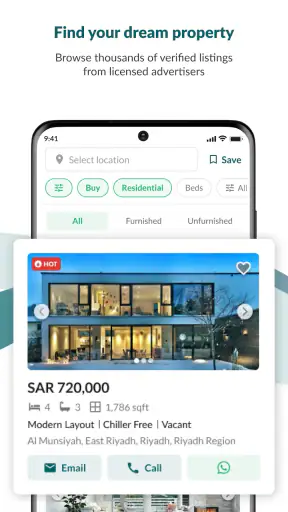
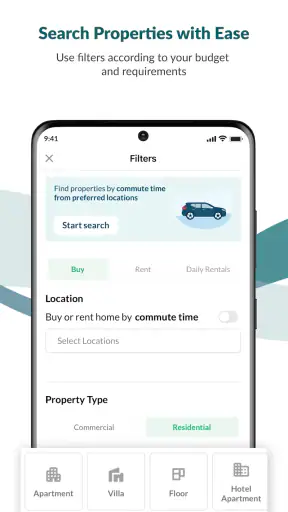
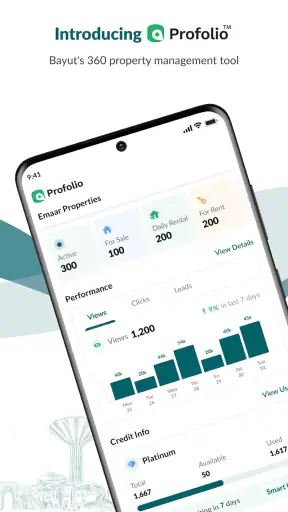
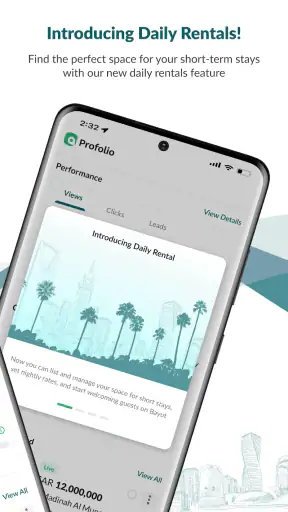
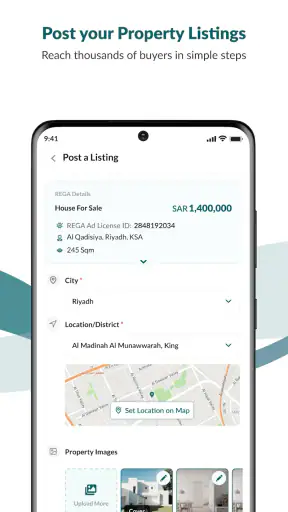
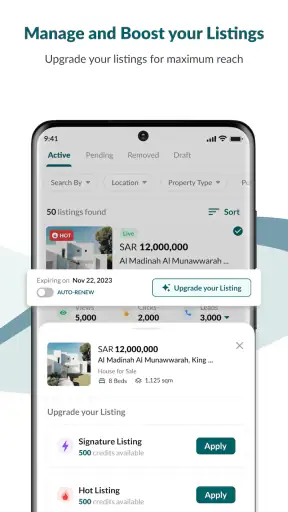
Finding a home in Saudi Arabia can quickly become a full-time task. Listings appear in different places, descriptions vary in detail, and it is easy to lose track of a property that looked promising yesterday. Bayut KSA is designed to make that search more manageable from a phone. I tried it as a house-and-home app, looking at how useful it feels for someone who is beginning with a broad idea rather than a precise address.
My first impression is that it works best as a focused property-search starting point. You can use it to look for homes to buy or rent, compare possibilities, and narrow a large market into a shortlist worth investigating. The app is free, suitable for everyone, and comes from Bayut ME (Middle East), a developer clearly focused on real estate in the region. It is available for Android devices running Android 8.0 or later, and the current version is 5.7.4.
The important thing to understand is that this is not a substitute for visiting a property or speaking with an agent. It is the tool I would use before those steps: a way to organize the search, recognize realistic options, and avoid spending time on homes that do not match my basic needs. That makes it particularly helpful for first-time renters and buyers who need a simple route from browsing to a meaningful shortlist.
What to expect when you open Bayut KSA
The app’s purpose is straightforward: search for properties in Saudi Arabia, then move from general browsing toward a more specific decision. The store summary describes it as a way to search, buy, or rent properties easily, but the practical value is in how you use those three intentions differently. Renting usually calls for attention to immediate suitability and ongoing cost, while buying requires a slower comparison of location, condition, and long-term fit.
I would not install it expecting an interior-design tool, a mortgage calculator, or a complete moving checklist. Its central job is property discovery. That narrow focus is useful because the interface does not need to compete with unrelated home features. When I am searching for a flat, villa, or another type of home, I want the app to help me answer a few basic questions quickly: where is it, what kind of property is it, is it available for my purpose, and is it worth contacting someone about?
The audience is broad. A student or young professional looking for a rental can begin with a neighborhood and a budget. A family can compare larger homes and think about access to daily necessities. Someone moving to a new city can use the app to understand how the available housing options are distributed before arranging viewings. It is also useful for a person who is not ready to contact anyone yet and simply wants to learn what the local market looks like.
The app has reached more than a million installs and holds an average rating of 4.2 from roughly three thousand ratings. I see those figures as signs that it has become a familiar option for property searching, not as a guarantee that every listing or every search experience will be perfect. Real-estate apps depend heavily on the quality, freshness, and completeness of the listings they display, so I would still verify important details directly.
How I would prepare before searching
Before typing anything, I would write down three categories: essentials, preferences, and deal-breakers. Essentials might include the city, whether I want to rent or buy, the number of bedrooms, and the highest amount I can realistically manage. Preferences could include a particular district, parking, or a specific property style. Deal-breakers might be a location that is too far from work or a home that is too small for the household.
This small preparation matters because property apps can encourage passive scrolling. Without a plan, attractive photos can pull me toward homes that do not fit my life. With a short list, I can use Bayut KSA as a comparison tool rather than treating each appealing listing as a possible decision.
I would also decide whether I am searching for a home to live in or an investment possibility. Those are not the same task. A home search is usually about comfort, commute, and daily practicality. An investment search needs separate research into demand, expenses, legal considerations, and the condition of the property. The app can help locate candidates, but it should not be treated as the complete analysis for either purpose.
Setting up a useful first search
The first meaningful setup is not complicated, but the quality of the results depends on the choices I make at the beginning. I start with the broadest location that still makes sense, then refine it. If I already know the exact district, I can search there. If I am new to a city, I prefer to begin with the city itself and learn which areas offer homes within my range.
Next, I separate renting from buying instead of mixing the two in my head. A monthly rental amount and a purchase budget represent very different commitments. Keeping the purpose clear makes later comparisons less misleading. I also choose a property type only when it reflects a real need; otherwise, I leave the search wider so that I do not miss a suitable alternative.
My advice is to avoid applying every filter immediately. A very narrow search can create the impression that nothing is available when the real issue is that the criteria are too strict. I begin with location, purpose, and a realistic financial limit. Then I add the feature that matters most. This staged approach is one of the simplest ways to keep the app useful for a first-time user.
When a result looks interesting, I read the entire listing rather than relying on the first photo or headline. I look for the property type, location wording, room arrangement, and any details that affect everyday use. Photos are helpful for forming an initial impression, but they cannot tell me whether the street is noisy, how the building is maintained, or whether the journey to work is practical.
A better way to build a shortlist
I recommend creating a shortlist in two passes. In the first pass, I save or note anything that appears broadly suitable. I do not try to make a final decision while scrolling. In the second pass, I compare those candidates against the same questions: does the location work, does the layout fit, is the condition acceptable from the available information, and would I actually arrange a viewing?
This prevents a common mistake: choosing the first listing with attractive photography. A less polished listing may still be a better match, while a beautifully presented home may fail on location or practical space. The app is most helpful when I use it to make comparisons rather than simply consume listings one by one.
Another useful habit is to record why I kept each property. I might write “near workplace,” “suitable room count,” or “worth checking after viewing.” That note becomes valuable after several searches, when different addresses and photos begin to blur together. It also makes conversations with family members more concrete because I can explain the reason behind each choice.
For a first-time renter, I would keep the initial shortlist small enough to manage. A handful of serious candidates is more useful than a huge collection of possibilities. For a buyer, I would allow a wider first pass, but I would still separate homes that deserve an in-person visit from those that are only useful for understanding the market.
Reaching the first successful action
For me, the first success is not installing the app or opening a listing. It is finding one property that passes a basic reality check and deciding what I need to verify next. That moment turns browsing into progress. I begin by searching with a clear purpose, narrowing the location gradually, and opening several results instead of judging the first one.
Once I find a promising home, I compare it with at least two alternatives from the same search. This gives me context. A property may look affordable until I notice that similar homes in the same area offer more space, or it may look expensive until I see that its location and layout are unusually convenient. The app helps with this side-by-side thinking even when the final comparison happens in my own notes.
A realistic everyday example would be a person moving for a new job. On a lunch break, they search for rentals close enough to the workplace, reject homes that exceed their limit, and keep a short list for the evening. Later, they can inspect the descriptions again, discuss the options with a partner or family member, and contact the most suitable listing. The app does not complete the move, but it reduces the first frustrating part: turning a vague need into specific homes.
For a family, the successful action may be different. Parents might begin with a broad area, compare larger properties, and identify which listings deserve a weekend viewing. They should pay attention to the difference between a home that looks spacious in photographs and one whose rooms actually support their routine. The app can start that evaluation, but walking through the property remains essential.
For someone buying, I would treat the first saved candidate as a research lead, not an offer. I would check the surrounding area separately, prepare questions about ownership and condition, and avoid making a financial decision based only on the information visible in an app. That cautious workflow is not a weakness of Bayut KSA specifically; it is the sensible way to use any online property marketplace.
What to verify before contacting anyone
Before I make contact, I review the listing once more and write down the exact points that need confirmation. These could include availability, the full cost structure, what is included, the condition of the property, and the timing for moving or completing a purchase. Asking focused questions is more efficient than sending a vague message and discovering later that the home does not fit.
I also check whether the listing gives enough information for a viewing to be worthwhile. If the location is described broadly, I want to understand the area before traveling. If the photographs show only selected rooms, I assume that I still need to inspect the rest of the property carefully. This mindset keeps the app in its proper role: a filter for opportunities, not proof that a property meets every expectation.
One non-obvious benefit of doing this preparation is that it exposes weak matches early. If I cannot explain why a listing suits my needs beyond “the pictures look nice,” it probably should not be at the top of my list. Conversely, if I can identify several concrete reasons and several questions to ask, I am ready for the next step.
Where first-time users may get confused
Property language can be less consistent than people expect. A listing may use terms that are familiar to local agents but unclear to someone arriving from another city or country. I do not assume that a label alone tells me everything about the layout, building arrangement, access, or included facilities. When a term affects my decision, I treat it as something to clarify.
Location is another area where caution helps. A neighborhood name can cover a large area, and a property that appears close on a general map may still create a difficult daily journey. I use the app to identify possibilities, then check the route at the times I would actually travel. A short distance is not automatically a short commute.
Photos can also create false confidence. Wide-angle images may make rooms feel larger, while a limited selection can hide maintenance issues or awkward spaces. I look for consistency between the written description and the images. If the wording suggests one arrangement but the photos suggest another, I add that discrepancy to my questions instead of guessing.
Budget confusion is especially common for renters. The amount shown for a property should not automatically be treated as the complete cost of living there. I ask about any additional charges, deposits, services, or conditions that may apply. For buyers, I take the same approach with transaction-related expenses and ongoing ownership costs. Bayut KSA can help me find the property, but I still need a complete personal budget.
Why the app may not be enough for every search
The main limitation is inherent to online listings: the app can show options, but it cannot recreate the experience of the building and surrounding street. Noise, odors, sunlight, parking behavior, maintenance response, and the feeling of the neighborhood are difficult to judge remotely. I would never let a polished listing remove the need for a proper viewing.
Another limitation is that a search can feel less useful when my requirements are unusually specific. If I need a rare combination of location, layout, timing, and budget, I may have to broaden the search or use additional local channels. A property app is strongest when there are enough relevant listings to compare; it is less powerful when the market does not offer many matches.
I also would not choose it as my only source if I need professional advice about contracts, financing, legal ownership, or investment risk. Those decisions require qualified guidance and documents, not just a convenient search interface. The app can save time at the discovery stage, but it should not be mistaken for legal or financial counsel.
Compared with asking friends or browsing general social-media posts, Bayut KSA feels more focused because the search starts with the property need rather than an unstructured stream of recommendations. Compared with contacting agents one by one, it gives me a broader first look and helps me arrive with clearer questions. On the other hand, a personal referral may provide local context that an app cannot, while direct agent conversations may reveal opportunities that are not immediately visible in a general search.
Using it beyond the first shortlist
After I have a shortlist, I stop treating the app as a scrolling feed. I use it as a reference point while arranging viewings and comparing what I saw online with what I find in person. This is where the earlier notes become important. I can mark which descriptions matched reality, which questions were answered, and which properties should be removed from consideration.
I would also repeat the search later rather than assuming the first session is complete. Housing needs change, and new listings can alter the comparison. However, I would avoid constantly refreshing without a decision process. A better routine is to search at a planned time, review the new possibilities, and update the shortlist only when a property genuinely improves on the existing options.
For renters, the next step after finding a suitable home is preparation: confirm the terms, arrange a viewing, inspect the property carefully, and understand the agreement before committing. For buyers, the process should be even more deliberate. The app can help identify candidates, but the investigation after that point needs documents, professional checks where appropriate, and a clear understanding of the total financial commitment.
One practical trade-off is speed versus certainty. Bayut KSA can make it quick to discover homes, but moving too quickly from a listing to a commitment is risky. I prefer using the app to accelerate low-risk tasks—searching, filtering, comparing, and organizing—while slowing down for high-risk tasks such as payment, signing, or making a purchase decision.
Who should use Bayut KSA, and who should look elsewhere?
I would recommend it to first-time property seekers who want a clear place to begin, renters comparing neighborhoods, families building a manageable viewing list, and buyers who need to understand what is available before speaking with professionals. Its free price makes experimentation easy, and the Everyone age rating means it is not restricted to a specialist audience. The app is also a sensible companion for someone relocating and trying to become familiar with the Saudi housing market.
I would be more cautious about recommending it as the only tool for people with highly unusual requirements, urgent legal questions, or a need for guaranteed real-time availability. Those users may benefit more from combining a property marketplace with direct local contacts and professional advice. Someone who dislikes comparing listings manually may also find the process demanding, because the app can present options but cannot decide which compromises are acceptable for them.
My strongest recommendation is to use it with a written checklist. That single habit turns a casual search into a repeatable process and protects against being distracted by presentation. Keep the location, purpose, budget, and non-negotiable requirements visible while browsing. Then use each promising listing to prepare better questions rather than to make assumptions.
Bayut KSA has been available since February 20, 2020, and its current version shows that it remains an actively maintained choice for this kind of search. I appreciate that it stays centered on buying and renting rather than trying to become an all-purpose home-management app. The experience is not flawless, because online listings always require verification and a narrow search can limit the results, but the core workflow is practical.
My final view is that Bayut KSA is most valuable at the beginning and middle of the property journey. It helps me move from “I need a home” to “these are the few properties worth investigating.” I would not use it as evidence that a home is perfect, nor as a replacement for viewing, contract review, or professional advice. Used with that realistic expectation, it is a useful free companion for searching, comparing, and taking the next sensible step toward a rental or purchase.
If I were recommending it to a friend, I would say: install it, define your search before you start, keep the first shortlist practical, and verify every important detail before committing. That approach makes the app reassuring for a beginner without pretending that a phone screen can answer every question about a real home.


